-업로드시에 [error updating content. unity package upload failed. failed to optimize file for upload]
1.VRChat SDK -> Setting 에서 Future Proof Publish 체크박스 해제하기
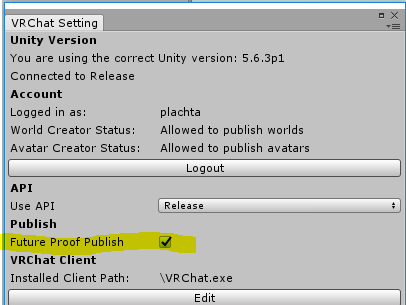
2.이전버전의 SDK사용
3.유니티 재시작, 또는 잠시 기다린후 다시 시도해보기
-Build&Publish 할떄 [please add a scence desriptor or avatar desriptor to your project]
1. https://gall.dcinside.com/m/vr/83 이글 12~13번 참조
-Build&Publish 할떄 [this avatar measures too large on at least one axis. it must be 5m on a side but it's bounds are(~,~,~)]
1.아바타 Scale을 줄여보자
-Polygons : ~~~~~ - This avatar has too many polygons. It must have less than 20k and should have less than 10k.
1.https://gall.dcinside.com/m/vr/80 이글 5번 참조
-업로드할떄 [Welcome to VRChat SDK! Before you can upload avatar ~~~]
이번에 업데이트로 VRChat을 일정시간 이상 플레이한 이상 유저만 아바타/월드를 업로드 할 수 있게 되었으니 게임하다가 업로드 권한이 주어지면 올리도록 하자
-VRChat게임에서 사람들주변에 가면 아바타 사라지는 현상
Setting에서 Personal Space를 해제하자